Complex configuration
How to configure multi-environment tests application using environment variables, .json and .runsettings files.
Prerequisites
Create a new Atata NUnit basic test project using the guide.
Introduction
Let’s say you have a tests application that should be run against different environments, e.g. local, QA, staging.
As the key parameter, which specifies the test environment, we’ll use TestEnvironment, which can have values like “local”, “qa”, “staging”.
Parameters that configure each environment are:
BaseUrl- the base URL of the application under test.AccountEmail- email of the account to use for login.AccountPassword- password of the account to use for login.WebDriverAlias- the name of the web browser driver alias to use in tests, e.g. “chrome-headed”, “chrome-headless”.
We want all parameters to be configured/overridden using environment variables.
In .runsettings files we’ll specify only the main parameters of tests application, such as TestEnvironment and WebDriverAlias.
Other configuration parameters we’ll configure in .json configuration files.
The NuGet packages needed to be added to the project are:
- Microsoft.Extensions.Configuration.Binder
- Microsoft.Extensions.Configuration.EnvironmentVariables
- Microsoft.Extensions.Configuration.Json
You might not need to configure both .runsettings and .json files for your project. It depends on your needs and preferences. It can be easier or even more complex. At the beginning using .runsettings with environment variables can be enough. The goal of the tutorial is to show how to use different configuration approaches together.
Environment variables
As a primary way to configure multi-environment tests application, environment variables can be used. Environment variables can be set on the machine, in CI pipelines, as well as in .runsettings files.
.runsettings files
You can configure .runsettings files for each environment you need. For this tutorial let’s configure 3 .runsettings files.
Find out more information on .runsettings file and how to use it in Visual Studio on Configure unit tests by using a .runsettings file article.
local.runsettings
<?xml version="1.0" encoding="utf-8"?>
<RunSettings>
  <RunConfiguration>
    <EnvironmentVariables>
      <TestEnvironment>local</TestEnvironment>
      <WebDriverAlias>chrome-headed</WebDriverAlias>
    </EnvironmentVariables>
  </RunConfiguration>
</RunSettings>
qa.runsettings
<?xml version="1.0" encoding="utf-8"?>
<RunSettings>
  <RunConfiguration>
    <EnvironmentVariables>
      <TestEnvironment>qa</TestEnvironment>
      <WebDriverAlias>chrome-headless</WebDriverAlias>
    </EnvironmentVariables>
  </RunConfiguration>
</RunSettings>
staging.runsettings
<?xml version="1.0" encoding="utf-8"?>
<RunSettings>
  <RunConfiguration>
    <EnvironmentVariables>
      <TestEnvironment>staging</TestEnvironment>
      <WebDriverAlias>chrome-headless</WebDriverAlias>
    </EnvironmentVariables>
  </RunConfiguration>
</RunSettings>
.json configuration files
config.local.json
{
  "baseUrl": "https://localhost:4404/",
  "accountEmail": "local.user@mail.com",
  "accountPassword": "abc123"
}
config.qa.json
{
  "baseUrl": "https://qa.example.org/",
  "accountEmail": "qa.user@mail.com",
  "accountPassword": "qapass"
}
config.staging.json
{
  "baseUrl": "https://staging.example.org/",
  "accountEmail": "staging.user@mail.com",
  "accountPassword": "stagingpass"
}
Configuration classes
You can define configuration class(es) to bind configuration parameters to these classes.
For a simple configuration, you can define only one class with all parameters and name it GlobalConfig.
GlobalConfig.cs
namespace AtataSamples.Configuration.MultiEnvViaRunSettingsAndJson;

public sealed class GlobalConfig
{
    public required string BaseUrl { get; init; }

    public required string AccountEmail { get; init; }

    public required string AccountPassword { get; init; }

    public required string WebDriverAlias { get; init; } = "chrome-headed";
}
You can also set default values for parameters in the configuration class, like for WebDriverAlias,
which will be used if these parameters are not specified in environment variables, .runsettings, .json, etc.
Global fixture
GlobalFixture class is a good place to read and apply configuration.
GlobalFixture.cs
using Microsoft.Extensions.Configuration;

namespace AtataSamples.Configuration.MultiEnvViaRunSettingsAndJson;

public sealed class GlobalFixture : AtataGlobalFixture
{
    private GlobalConfig? _config;

    protected override void OnBeforeGlobalSetup()
    {
        string testEnvironment = Environment.GetEnvironmentVariable("TestEnvironment") ?? "local";

        var configuration = new ConfigurationBuilder()
            .AddJsonFile($"config.{testEnvironment}.json")
            .AddEnvironmentVariables()
            .Build();

        _config = configuration.Get<GlobalConfig>();
    }

    protected override void ConfigureAtataContextBaseConfiguration(AtataContextBuilder builder)
    {
        builder.Sessions.AddWebDriver(x => x
            .UseStartScopes(AtataContextScopes.Test)
            .ConfigureChrome("chrome-headed", x => x
                .WithArguments(
                    "start-maximized",
                    "disable-search-engine-choice-screen")
                .WithArtifactsAsDownloadDirectory())
            .ConfigureChrome("chrome-headless", x => x
                .WithArguments(
                    "headless=new",
                    "window-size=1920,1080",
                    "disable-search-engine-choice-screen")
                .WithArtifactsAsDownloadDirectory())
            .UseDriver(_config!.WebDriverAlias)
            .UseBaseUrl(_config!.BaseUrl));

        builder.LogConsumers.AddNLogFile();
    }

    protected override void ConfigureGlobalAtataContext(AtataContextBuilder builder)
    {
        builder.UseState(_config);

        builder.SetUpWebDriversForUse();
    }
}
Usage in test suites
Because GlobalConfig instance is added to state of a global AtataContext in GlobalFixture.ConfigureGlobalAtataContext method,
you can access GlobalConfig instance from any test suite class by calling:
Context.State.Get<GlobalConfig>();
This is optional, but you can create a base test suite class for easier access to configuration properties.
TestSuite.cs
namespace AtataSamples.Configuration.MultiEnvViaRunSettingsAndJson;

public abstract class TestSuite : AtataTestSuite
{
    protected GlobalConfig Config =>
        Context.State.Get<GlobalConfig>();
}
Then after you inherit your test suites from this base class, you’ll be able to access configuration properties via Config property.
SignInTests.cs
namespace AtataSamples.Configuration.MultiEnvViaRunSettingsAndJson;

public sealed class SignInTests : TestSuite
{
    [Test]
    public void SignIn() =>
        Go.To<HomePage>()
            .SignIn.ClickAndGo()
                .Email.Set(Config.AccountEmail)
                .Password.Set(Config.AccountPassword);
}
Usage outside of test suites
If you need to access configuration from any class, outside of test suites, you can do it this way:
AtataContext.ResolveCurrent().State.Get<GlobalConfig>();
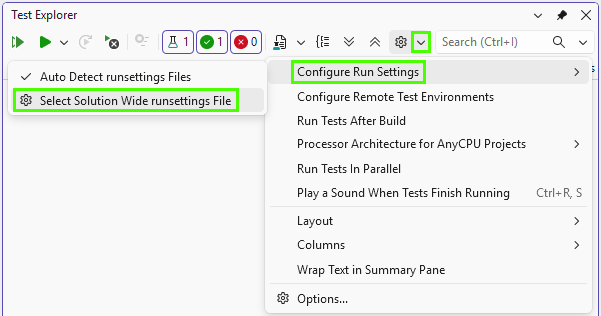
Select .runsettings file in Visual Studio
To select/switch current .runsettings file in Visual Studio:
Specify .runsettings file in CI/CD
In order to run tests on CI using concrete browser, use -s parameter of dotnet test command to specify a .runsettings file.
dotnet test ./AtataSamples.Configuration.MultiEnvViaRunSettingsAndJson.csproj -s local.runsettings